Instagram Profile: The best setting there is Private
Updated July 2021 : Here are the steps to getting it done, for iPhone and Android Phones:
Tap the profile icon in the lower right-hand corner of your screen, and then tap the menu icon in the upper right.
If you are on a Schools Parents Association, we think you should ask School to recommend this approach to parents, teachers and kids and monitor the accounts in class.
Setting up Instagram privacy is easy
Nice and Easy!
Tap the profile icon in the lower right-hand corner of your screen
Tap the menu icon in the upper right
Tap Account Privacy then tap the button next to Private Account
Choose to block everyone or just certain photos
Done that's it
From iPhone or Android
Setting up Instagram privacy on a Phone is easy
From a Mobile Phone Browser
Setting up Instagram privacy on a Phone browser is easy
From a Computer
From a Computer setting up Instagram privacy on a Phone browser is easy
Setting up Instagram privacy is easy
Tap Settings > Privacy.
Tap Account Privacy then tap the button next to Private Account.
Note – If it's not your whole profile you want to make private, but just a few pictures, there is the option to hide 'select photos' on your Instagram account. The option is in the photo menu. That is it, your Instagram profile is private. For kids and young teenagers we ALWAYS recommend blocking the whole account.
Switch on Privacy, for either the whole account or just certain photos.
That's it, your Instagram profile is private. As long as you have Private Account option is on, only the users who are currently following you, plus any new users you approve if they request to follow you, will be able to see your Instagram content.
That's is it, you're Safe.
Steps
Tap the profile icon in the lower right-hand corner of your screen
Tap the menu icon in the upper right
Tap Account Privacy then tap the button next to Private Account
Choose to block everyone or just certain photos
Done that's it
>>>>>>>>>>> >>>>>>>>>>>>>> >>>>>>>>>>>>>>>
That's it, happy instagramming
Norton 360 Premium App – Catch a summer bargain limited numbers available at this price… Check Pricing
To provide the best experiences, we use technologies like cookies to store and/or access device information. Consenting to these technologies will allow us to process data such as browsing behaviour or unique IDs on this site. Not consenting or withdrawing consent, may adversely affect certain features and functions.
Functional
Always active
The technical storage or access is strictly necessary for the legitimate purpose of enabling the use of a specific service explicitly requested by the subscriber or user, or for the sole purpose of carrying out the transmission of a communication over an electronic communications network.
Preferences
The technical storage or access is necessary for the legitimate purpose of storing preferences that are not requested by the subscriber or user.
Statistics
The technical storage or access that is used exclusively for statistical purposes.The technical storage or access that is used exclusively for anonymous statistical purposes. Without a subpoena, voluntary compliance on the part of your Internet Service Provider, or additional records from a third party, information stored or retrieved for this purpose alone cannot usually be used to identify you.
Marketing
The technical storage or access is required to create user profiles to send advertising, or to track the user on a website or across several websites for similar marketing purposes.



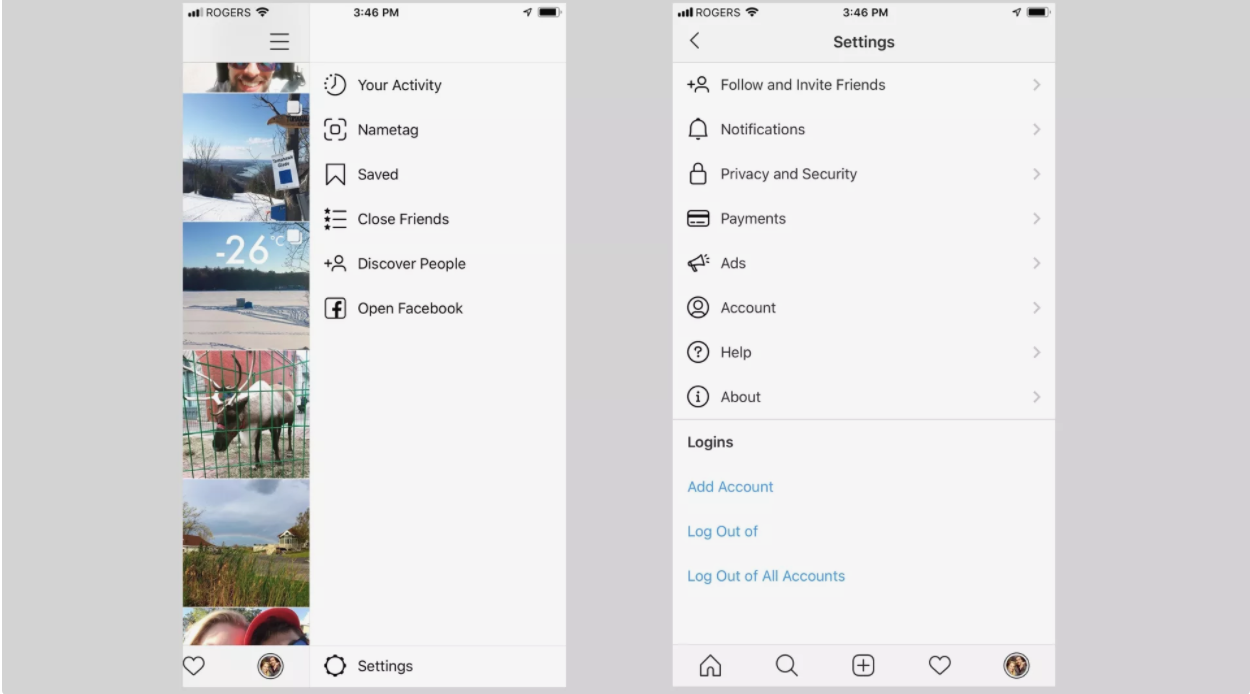 Setting up Instagram privacy is easy
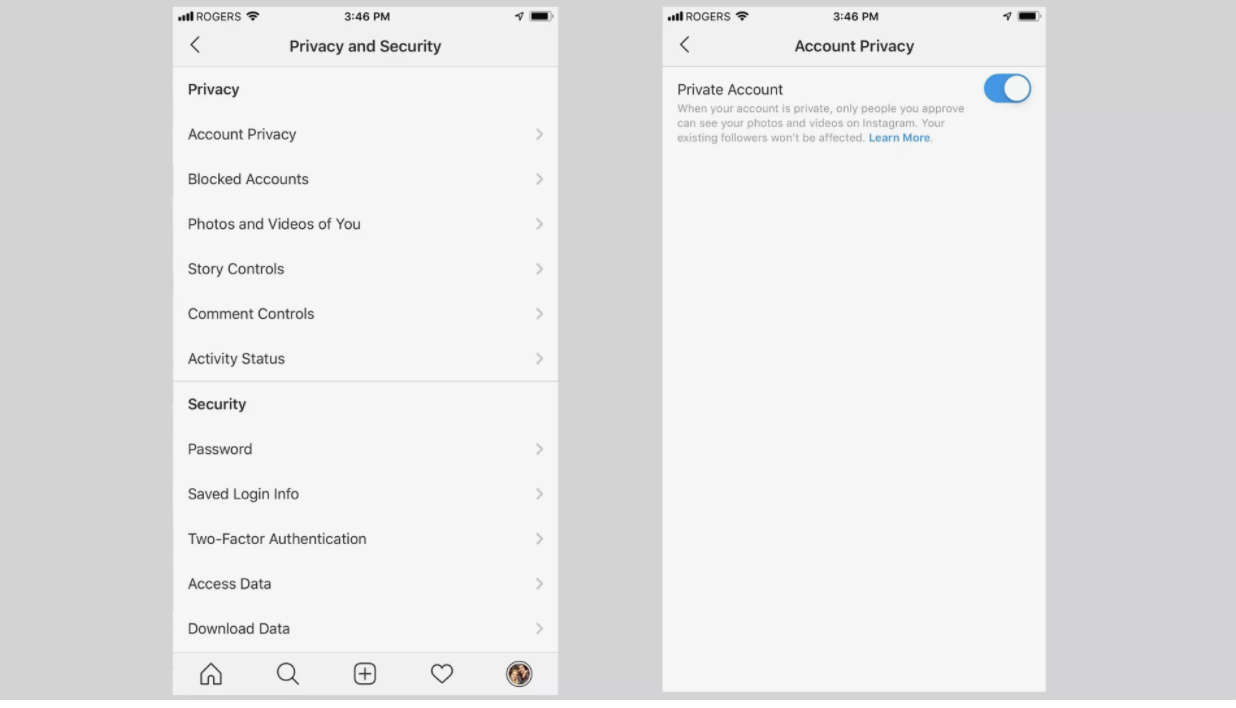 Switch on Privacy, for either the whole account or just certain photos.